The idea in one paragraph
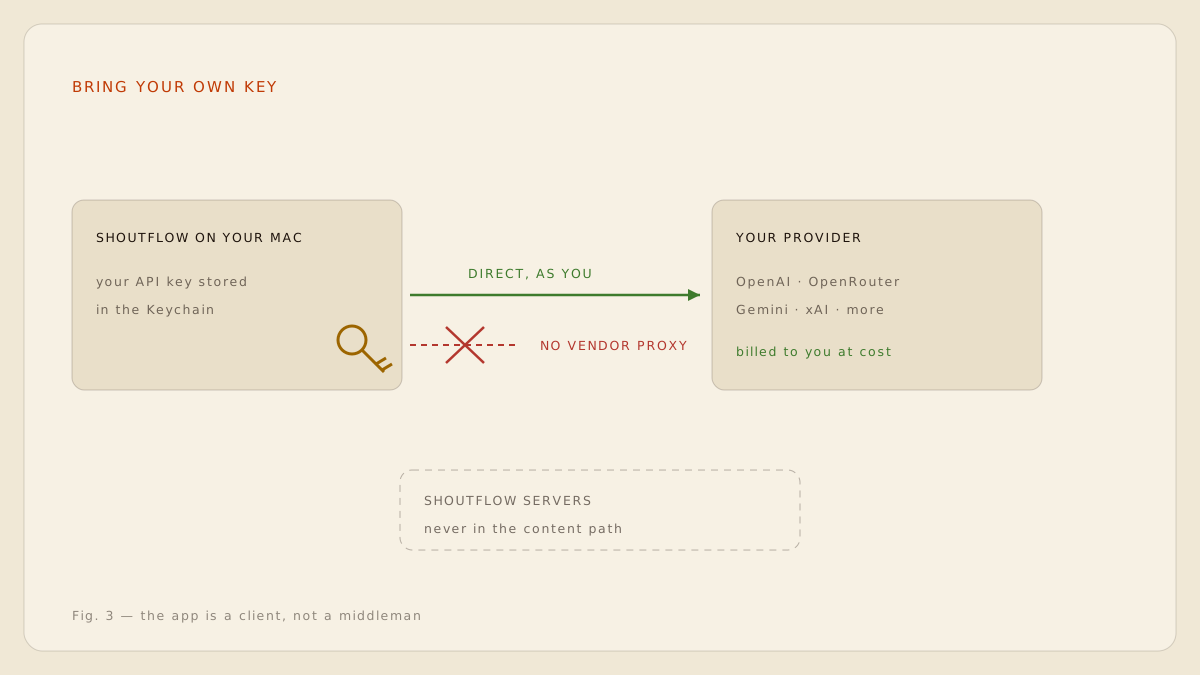
Instead of the app vendor running cloud AI on your behalf, marking up the cost and inserting themselves into your data path, a BYOK app is a client. You create an API key with a model provider you already trust, paste it in once, and the app talks to that provider directly from your machine, authenticated as you. The vendor never proxies the traffic and never sees the content. [1]
Why it beats a bundled subscription
| Bundled subscription | BYOK with ShoutFlow | |
|---|---|---|
| Who bills you for AI | The app vendor, with margin | Your provider, at cost |
| Who sees your content | Vendor and provider | Your provider only |
| Model choice | Whatever the vendor picked | Any model your key can reach |
| Usage limits | Metered by the vendor | Set by your own provider account |
| Cancel the app, keep the model | No | Yes: the account is yours |
How ShoutFlow does BYOK
Your key lives in the macOS Keychain, never in our database. When you dictate with a cloud tone selected, the request goes from your Mac straight to the provider endpoint over TLS, with your key in the header. ShoutFlow servers are not on that path, which you can verify with any network inspector. [2]
- Create an API key with your chosen provider (OpenAI, OpenRouter, Gemini, xAI and others).
- Paste it into ShoutFlow's provider settings once; it is stored in the Keychain.
- Pick a cloud tone for the contexts where you want frontier-model clean-up.
- Watch your own provider dashboard for usage: that bill is the whole bill.
The honest business model for an AI client is selling the client. The model is between you and your provider.
When to use BYOK, and when not to
Local mode covers everyday dictation well. Reach for BYOK when the writing matters more: a difficult email, a public post, text in a second language, or jargon the on-device model has not seen. The point is that the choice is per-context and always yours. [3]