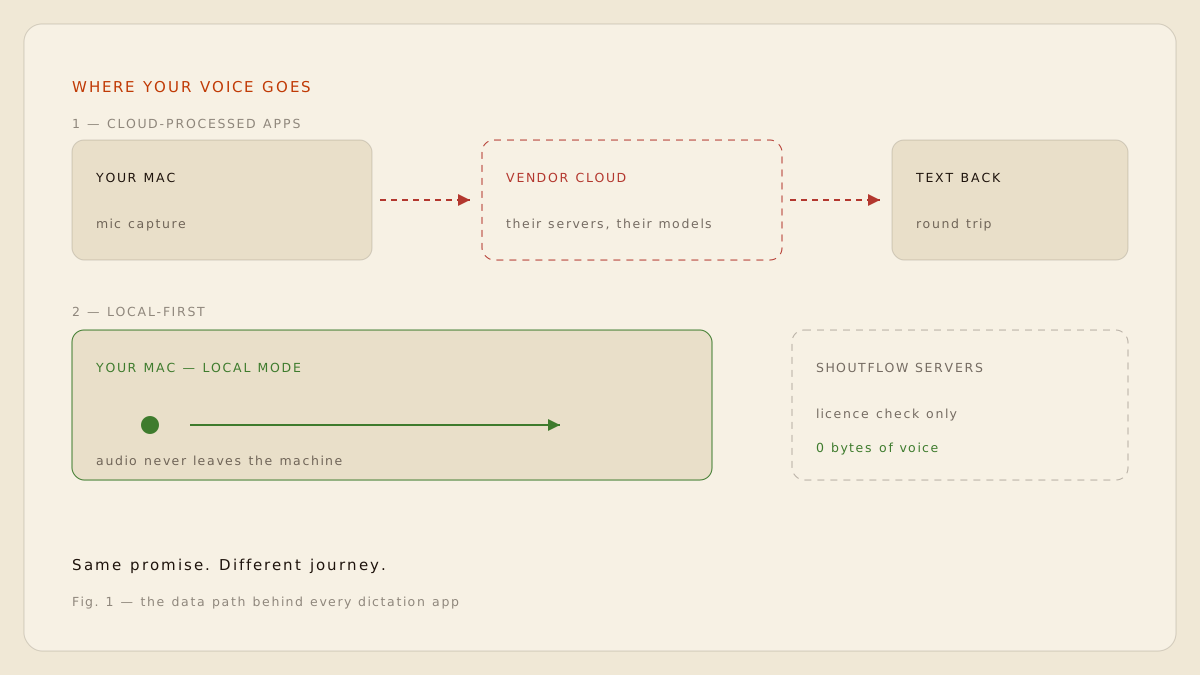
You press a hotkey, you talk, text appears. Between those two moments, your voice takes a journey, and depending on the app, that journey is either a few centimetres of silicon or a round trip through several companies' infrastructure. This note is a map of that journey. It applies to any dictation tool, not just ours.
The three architectures
Strip away the marketing and every dictation product fits one of three shapes. The shape determines who can hear you, who can read the transcript, and what happens to your words after they land on screen. [1]
1. Cloud-processed
The dominant model. Audio is captured locally, then uploaded to the vendor's servers, where their speech models transcribe it and (usually) their language models clean it up. This is how most modern AI dictation apps work, typically sold as a monthly subscription.
2. Vendor-relayed
A quieter variation. The vendor does not run its own models, but still passes your audio through its own servers to a third-party API. Your voice touches infrastructure you never agreed to, run by a company whose data policy you have never read.
3. Local-first
Audio is captured, transcribed and cleaned up on your machine. The vendor's servers handle licensing and payments, never content. Modern Apple Silicon makes this not just possible but fast: transcription starts while you are still speaking. [2]
Private by architecture beats private by policy. A policy can change; a data path cannot lie.
What actually leaves your machine
In a cloud architecture, three things leave: the raw audio, the transcript, and usually metadata about when and where you dictated. In a local architecture, nothing content-bearing leaves at all. The only network traffic is a licence check and, if you opt in, a direct connection from your Mac to a provider you chose yourself. [3]
WHAT TRAVELS, BY ARCHITECTURE
CLOUD
Audio, transcript, metadata
Everything content-bearing is uploaded. Retention and training use depend entirely on the vendor's policy.
RELAYED
The same, plus a middleman
Content crosses the vendor's servers on the way to a third-party model, adding a party you never chose.
LOCAL
Nothing content-bearing
Voice and text stay on the Mac. Optional BYOK requests go directly from your machine to your provider.
The questions that reveal the truth
You do not need to audit a network trace to work out which architecture an app uses. Five questions, asked of the marketing page or the privacy policy, will tell you almost everything.
- Where is my audio processed: on my device, or on your servers?
- Can any human at the company read or hear my dictation?
- Is my voice used to train models, now or under a future policy change?
- What exactly happens when I delete my account or uninstall?
- Can I use my own provider key so nothing is proxied through you?
Where ShoutFlow sits
ShoutFlow is local-first. On supported Apple Silicon Macs, WhisperKit transcribes and MLX cleans up entirely on-device. If you want a frontier model doing the clean-up, BYOK mode sends requests directly from your Mac to your provider of choice, authenticated as you. ShoutFlow's own servers handle licensing and commerce, and that is all. [2]