Start with the free option. Apple's Dictation is already on your Mac, works wherever you can type and, on current macOS, accepts dictation of any length. The often-repeated 30-second limit is wrong: Apple says Dictation stops after 30 seconds of silence, not after 30 seconds of speaking. [1]
Pay for a separate app only when the built-in workflow costs you more in correction, clean-up or friction than the paid tool costs in cash. Then compare three things separately: the app fee, any metered cloud processing and how long you realistically expect to keep the app.
That calculation is more useful than a generic free-versus-paid feature list.
Three billing models, with hybrids in between
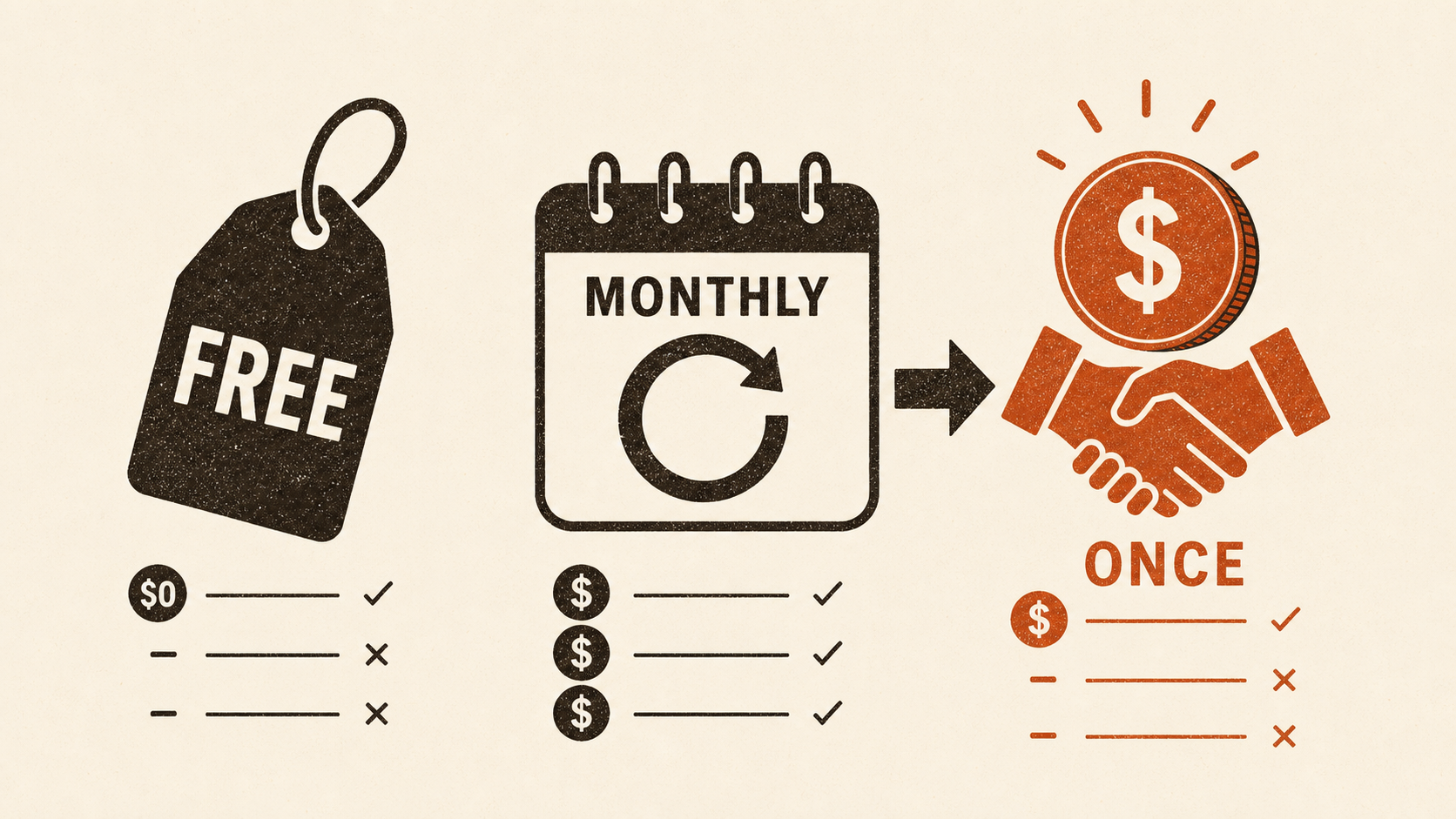
Most Mac dictation offers use one or more of three billing models:
- Free: no app fee. Apple Dictation is the baseline, while some third-party apps also have capped or feature-limited free tiers.
- Subscription: a monthly or annual payment. Wispr Flow currently lists Pro at $15 monthly or $12 per month when billed annually. [2]
- One-time licence: one payment for continuing access under the seller's stated terms. VoiceInk lists its one-Mac Solo licence at $29 with lifetime updates. [3] ShoutFlow is $25 for one Mac. [6]
The categories overlap. Superwhisper, for example, offers monthly, annual and $249.99 lifetime versions of the same Pro plan. [4] A free tier can sit beside a subscription, and a pay-once app can still charge separately for optional cloud use.
Treat the model as a billing description, not a verdict on the product.
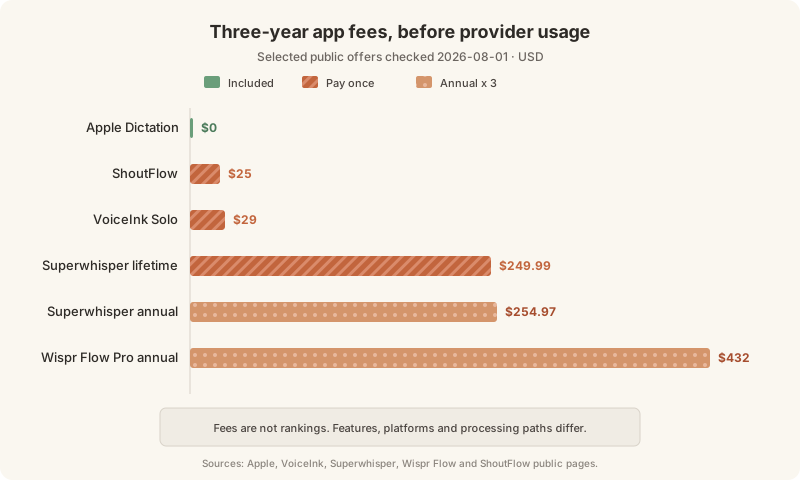
The three-year app-fee comparison
A three-year window is long enough to expose recurring costs without pretending you know which app you will still want in ten years.
| Offer checked on 2026-08-01 | Billing used for comparison | Three-year app fee |
|---|---|---|
| Apple Dictation | Included with macOS | $0 |
| ShoutFlow | $25 once | $25 |
| VoiceInk Solo | $29 once | $29 |
| Superwhisper lifetime | $249.99 once | $249.99 |
| Superwhisper annual | $84.99 each year | $254.97 |
| Wispr Flow Pro annual | $144 each year | $432 |
These are fees, not product rankings. The plans differ in platform coverage, features and processing. We have not run a controlled accuracy comparison between them, so the table cannot tell you which will produce the best text for your voice.
It does answer a narrower question. Wispr Flow's current annual rate reaches $432 after three years. VoiceInk and ShoutFlow stay at their purchase prices, assuming their current licence terms continue to cover the version you use. Superwhisper's $249.99 lifetime option needs about 2.94 years to beat its own $84.99 annual plan.
The cheap option is only cheap if it fits the job. Paying $29 for the wrong workflow wastes $29; paying $144 for a tool you use every working day may be entirely sensible.
BYOK can reverse the result
Bring your own key, usually shortened to BYOK, means the app sends a selected stage directly to an AI provider using your account. The app seller and the provider then charge separately.
Do not lump every BYOK cost together. Cloud transcription is commonly billed by audio duration. Text clean-up is commonly billed by input and output tokens. A calculation for one does not price the other.
OpenAI currently lists Whisper transcription at $0.006 per minute. [5] If an app sends one hour of audio to Whisper every day, the arithmetic is:
- $0.006 × 60 minutes = $0.36 per hour
- $0.36 × 30 days = $10.80 in a 30-day month
- $0.36 × 365 days = $131.40 per year
- three years of daily use = $394.20
At that volume, a $25 licence plus cloud transcription costs $156.40 in year one. That is slightly more than a $144 annual subscription with bundled processing. The crossover is roughly 66 minutes of paid Whisper transcription per day, assuming the subscription truly bundles equivalent usage and neither price changes.
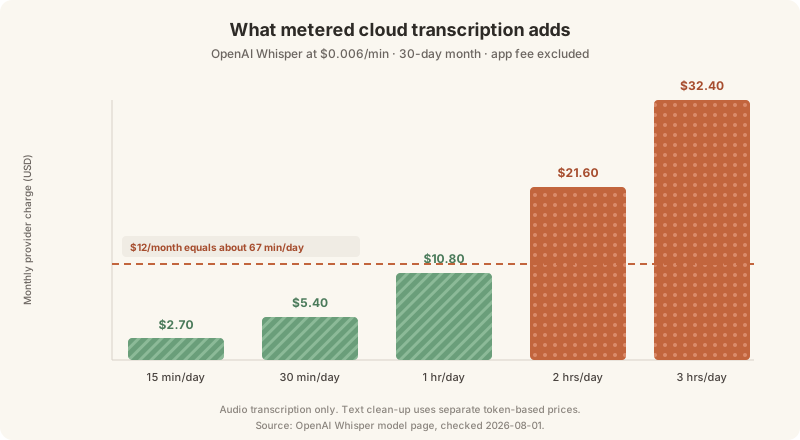
This is a budget comparison, not an accuracy claim. A local model, OpenAI Whisper and a subscription service's own pipeline are not interchangeable merely because all three turn speech into text.
ShoutFlow makes the distinction visible because it can run transcription and clean-up locally, or use BYOK for either selected stage. Its $25 app price has no provider bill in the fully local path. Provider charges apply only when you choose a cloud path. [6]
Free is better than the usual comparison pages admit
Apple's current documentation says Dictation can handle text of any length. It also supports automatic punctuation in supported languages, lets you type while speaking on Apple silicon and offers spoken punctuation and simple formatting commands. [1]
That does not make a paid app pointless. It removes a lazy reason for buying one.
Try Apple Dictation with the work you actually do: a long email, a rough document paragraph and several short messages. Check Keyboard settings as Apple instructs to see whether voice input for your chosen language is processed on the device. Then note the practical failures. Perhaps names need constant correction, the text needs too much clean-up, or you want a history after you dismiss the result. Those are reasons to test another workflow. An invented 30-second speaking cap is not.
If Voice Control is enabled, Apple says standard Dictation is unavailable. Voice Control is the separate accessibility tool for entering text and controlling the Mac by voice. That distinction matters when a free trial appears not to work as expected. [1]
A decision rule that survives price changes
Prices will move, so use a method you can rerun in five minutes.
- Write down the job. Live text at the cursor, file transcription and meeting notes are different jobs. Do not compare prices until the products solve the same one.
- Use a realistic horizon. Choose one year if you often change tools, three years if the workflow is stable. Avoid valuing "lifetime" as infinite use.
- Separate app and processing costs. For metered transcription, multiply price per minute by your actual daily minutes. Price text clean-up separately from its provider's token rates.
- Check what the licence covers. Devices, operating systems, updates, refunds and free-tier caps can matter more than a small headline-price difference.
- Test before paying. Accuracy, microphone behaviour and text insertion depend on your Mac and your speech. A pricing table cannot settle them.
For occasional dictation, Apple is the sensible first choice. For regular Mac-only use with acceptable local processing, a one-time licence can keep the cash cost low. A subscription becomes easier to justify when you need its particular workflow, supported platforms or bundled cloud usage. BYOK suits people who want provider choice and are willing to watch a variable bill.
Pick the processing path first. Then pick the billing model that funds it without surprising you.