Apple Dictation is free, built into every Mac, and on Apple Silicon it runs entirely on-device. For short dictation, a quick message, a search query, a sentence in Notes, it does the job.
For anything longer, or anything technical, the correction time starts to cancel out the speed gain. That is the line. Below it, Apple Dictation is the right tool. Above it, a dedicated dictation app earns its price by producing text that needs less fixing.
This article maps what actually sits on each side of that line. No star ratings, no affiliate links, no invented benchmarks. Just what the tools do, where the evidence lands, and how to decide.
What Apple Dictation does well
Apple Dictation has improved more than most people realise.
On any Mac with an M1 chip or newer, running macOS Ventura or later, dictation is processed entirely on-device. [2] [3] Nothing leaves the Mac. There is no time limit. The old 30 or 60-second timeout people remember from earlier macOS versions is gone on Apple Silicon. [5] You press the shortcut (default is double-pressing the Fn key, or you can set a custom one), speak, and text appears wherever your cursor is.
It works in every app. Slack, Notes, a browser text field, Terminal. Apple Dictation injects text at the system level, so no app needs explicit support. That is genuinely useful and not something every paid alternative handles smoothly.
For a sentence or two of plain English dictation, the accuracy is reasonable. Wirecutter's 2026 review puts dedicated dictation apps at around 97 percent accuracy on average. [1] Apple Dictation on current hardware sits a few points below that. Independent reviews place it in the 90 to 95 percent range depending on accent, microphone and background noise. [3] [5] On a short message, that difference is negligible. You might fix one word.
Where Apple Dictation hits its ceiling
Three problems emerge when you use it for real work.
Accuracy drops on paragraphs. This is the most widely reported limitation. Short sentences work. But when you dictate a full paragraph, a work email, a section of a document, an explanation with domain language, the error rate climbs. [4] Not catastrophically, but enough that you spend more time editing than you would with a keyboard.
There is no post-processing. What you say is what you get. Filler words, false starts, repeated phrases. They all land in the text. Apple Dictation does not remove "um," does not format paragraphs, does not capitalise sentences reliably. [4] [5] You clean up the output yourself.
A practical example: dictate "We should probably circle back with the Devlin team on Thursday, I think the integration timeline needs another look given the API changes last week" and Apple Dictation might give you "We should probably circle back with the Devlin team on Thursday I think the integration timeline needs another look given the API changes last week" with no comma, no capital letter after the full stop it ignored, and "Devlin" might come out as "devlin". A dedicated app removes "probably" and "I think", inserts punctuation, and keeps the proper noun. That is a 30-second correction job versus a 5-second one. Over a day of dictation, the difference compounds.
No context awareness. Apple Dictation treats every text field identically, whether you are writing a commit message in Terminal or a client email. It has no custom vocabulary, no way to learn from corrections and no understanding of domain terms. Programming symbols, product names, legal terminology. Expect to type those manually after dictating the surrounding text. [4] [5]
These are not bugs. They are design boundaries. Apple built a system-level transcription feature, not a writing tool. The question is whether your workflow stays within those boundaries.
What a dedicated dictation app adds
Dedicated dictation apps sit on the other side of a different design choice: dictation as a primary input method rather than an occasional convenience.
The best of them use Whisper or equivalent models. Whisper was trained on 680,000 hours of multilingual audio and is the reason dedicated apps consistently hit 95 to 99 percent accuracy in independent reviews. [3] [5] Raw accuracy is only part of it, though. The practical differences are:
AI cleanup. The app does not just transcribe. It processes. Filler words are removed. Sentences get proper punctuation and capitalisation. Paragraph breaks are inserted. What comes out reads like typed text, not transcribed speech. [4]
Context awareness. Some apps read the active window title or surrounding text to understand whether you are in a code editor, a messaging app or a document. [5] Programming symbols get inserted as characters, not spelled out. Technical terms that Apple Dictation would mangle come through correctly because the model has seen them in context.
Custom vocabulary. If you use specific product names, acronyms or jargon, you can add them. The app learns from corrections over time.
Workflow integration. This varies by app. Some inject text system-wide like Apple Dictation. Some offer modes: "email mode" for polite prose, "note mode" for rough drafting. Some let you chain dictation commands.
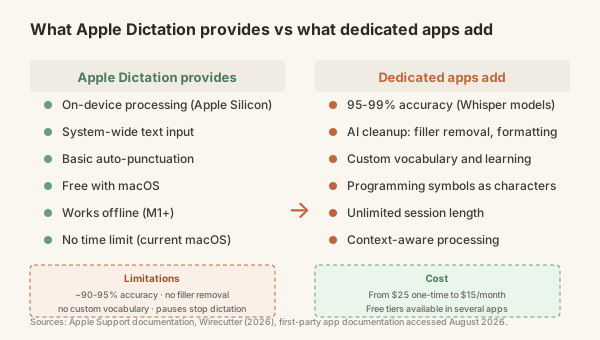
The trade-off is that you pay for it and you may give up some privacy, depending on the app.
The pricing landscape
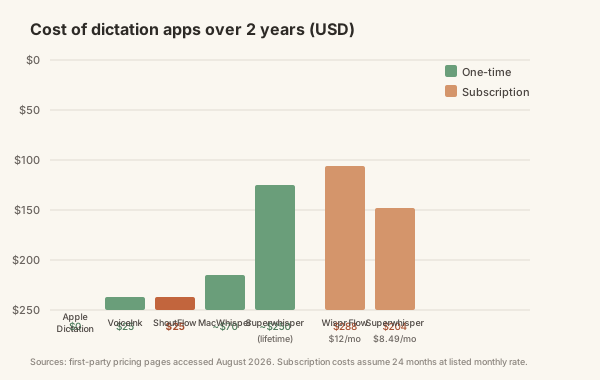
Dedicated dictation apps fall into two pricing models:
Pay once, own it. VoiceInk starts at $25 for a solo lifetime licence. MacWhisper Pro is €64. Superwhisper Pro has a lifetime option around $250. ShoutFlow is $25 for a lifetime licence. These apps process dictation locally on your Mac. No subscription, no cloud dependency once installed.
Subscribe. Wispr Flow charges $12 to $15 per month. Superwhisper Pro is $8.49 per month if you prefer that over the lifetime option. These tend to include cloud processing features like AI rewriting or cross-device sync.
The cheapest way to get Whisper-powered dictation is a $25 one-time purchase. At that price, the maths is straightforward: if it saves you two minutes of text correction per day, it pays for itself inside a month compared to the time you would spend cleaning up Apple Dictation's output.
The privacy line
Where the audio goes matters, and the options split clearly.
Apple Dictation on Apple Silicon stays on-device. [2] [3] VoiceInk, MacWhisper, Superwhisper and ShoutFlow also process locally by default. Some offer optional cloud features if you want them.
Wispr Flow is cloud by design. Audio goes to external servers, including OpenAI and Meta, for processing. [5] That may or may not matter to you, but it is worth knowing before you dictate anything confidential or client-related.
If you work with sensitive material, legal, medical, financial, or anything under NDA, stick with an on-device option. Free or not, Apple Dictation on Apple Silicon qualifies. So do the local-first paid alternatives.
How to decide
Rather than a ranking, here is a decision framework:
Use Apple Dictation if: you dictate a few sentences at a time, mostly plain English, in casual contexts. You do not mind fixing the occasional error or speaking punctuation marks aloud. It is free, it is already installed, and on Apple Silicon it is private.
Get a dedicated app if: you dictate paragraphs or longer, you work with technical or domain-specific vocabulary, you want what you dictate to come out clean with minimal editing, or you want dictation to become a primary input method rather than a convenience.
Pick a pay-once local-first app if: you want the accuracy and cleanup of a dedicated app without a recurring subscription and without sending audio to a cloud service.
VoiceInk at $25, MacWhisper Pro at €64 and ShoutFlow at $25 all run Whisper or equivalent models locally. They differ in features: VoiceInk is open source and spartan, MacWhisper leans toward transcription, and ShoutFlow adds a two-stage engine with a separate AI cleanup pass plus the option to use your own API key from seven different providers. But the core value proposition is the same: pay once for dramatically better dictation, keep the audio on your Mac.
Go with a subscription app if: you want cloud-powered AI rewriting or cross-device sync and you are comfortable with the audio privacy trade-off.
The honest answer
For most people who dictate more than the occasional message, a dedicated app is worth it. Not because Apple Dictation is bad. It has genuinely improved on Apple Silicon, and for quick dictation it is the right tool. But because the gap between transcription and finished text matters more than the gap between raw accuracy scores.
Transcription is getting words onto the screen. Finished text is getting words onto the screen in a state where you can move on to your next thought without pausing to edit. Apple Dictation handles the first. A dedicated app handles both.
At $25 one-time, the upgrade costs less than most people spend on lunch in a week. If it saves you five minutes of correction per day, the maths is not close.