A network monitor can tell you whether a Mac dictation app opens connections while you speak, where those connections go and how much data moves. That is enough to catch some false "local" claims. It is not enough to certify an app as private after one quiet run.
The useful test is a comparison: record a baseline, dictate a fixed passage in the app's local mode, repeat in each cloud or clean-up mode, then compare the timing and destinations. If traffic starts with your speech and stops with it, the vendor owes you an explanation. If nothing appears, record that narrower result: no dictated-content traffic was observed in this version and configuration.
Set up a test you can repeat
Write down the app version, macOS version, selected transcription provider, selected clean-up provider and whether any automatic fallback is enabled. A label such as "local transcription" says nothing about a separate clean-up stage that may send the transcript elsewhere.
Use a harmless script for every run. For example:
This is a network test recorded at ten fifteen. The order number is orange seven four. Please turn this into one clear sentence.
The odd phrase gives you something recognisable if a proxy later exposes plaintext. Do not dictate customer material, passwords or anything sensitive while you are experimenting with interception tools.
Run these four passes:
- Open the app and say nothing for 60 seconds. This is the launch and idle baseline.
- Dictate the script for 30 to 60 seconds in the claimed local mode.
- Stop dictating and wait another 60 seconds. Some apps upload or synchronise after recording ends.
- Repeat with each cloud transcription, clean-up, sync or history option you may actually use.
Quit unrelated apps first. Disable optional sync tools if practical. Keep the raw capture or screenshots with the date and settings. The point is not to produce a dramatic verdict. It is to make the observation reproducible.
Start with Little Snitch
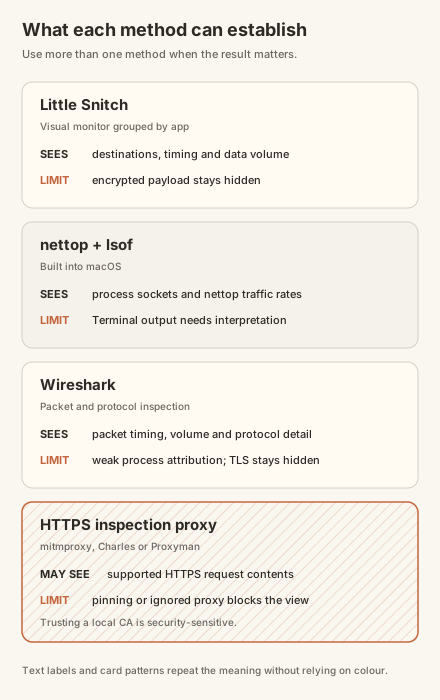
Little Snitch is the simplest visual option. Its Network Monitor groups connections by app and shows destinations, ports, protocols and data volumes in real time. The current demo provides full functionality in restartable three-hour sessions, while Network Monitor expires after 30 days. [1] The order page separates single licences, family licences and bundles, so check the current product line rather than copying a bundle price into a comparison. [2]
Install it, open Network Monitor and filter for the dictation app. Use Silent Mode if you want new connections allowed and recorded without an alert interrupting the test. Then run the four passes above.
Look for correlation, not merely the existence of a connection. A small request at launch may be a licence check or update request. A stream that begins when recording starts, grows with the length of the recording and stops when processing finishes is more relevant. Note the hostname and volume, but do not leap from volume to payload. Compressed audio, transcript text, model downloads and telemetry can all produce different sizes.
Little Snitch cannot normally show the contents of encrypted HTTPS requests. It can establish that a process contacted a destination and moved data. It cannot tell you, by itself, whether those bytes were audio, text, a licence lease or an update manifest.
Use the built-in tools for a quick check
If you do not want to install anything, start with nettop:
Find the app or a related helper process, then press d to switch to delta mode. Watch the outgoing byte count during the idle, dictation and post-dictation windows. A helper process matters because network work does not always run under the visible app's name.
lsof is useful for listing open internet sockets:
An open socket does not prove that data is moving. Run the command before, during and after the test, and treat it as a pointer to investigate rather than a verdict.
tcpdump captures packets from an interface, but it is a machine-wide packet tool rather than a friendly per-app monitor:
The active interface may not be en0, and the output will include traffic from the rest of the Mac. It is useful when you already know the destination IP or port. For first-pass process attribution, nettop or Little Snitch is less error-prone.
Wireshark adds packet detail, not automatic app attribution
Wireshark is free and open source. It captures and lets you inspect network protocols in much greater detail than a process monitor. [3] It does not reliably tell you which native Mac app owns every packet, so first identify the app's destinations with Little Snitch or nettop, then filter Wireshark by that IP address or hostname.
Capture the active interface while you run the same test script. Useful filters include:
Replace the example address with one you observed. DNS lookups can reveal a domain, but the timing alone does not prove the dictation app made the lookup. Other processes and shared system services create background traffic.
Most useful payloads will be protected by TLS. "Follow TCP Stream" can reconstruct the encrypted conversation and show timing and byte counts, but it will not magically expose the audio or transcript. Wireshark is strongest here as a second opinion on destinations, timing and transfer size.
An HTTPS inspection proxy is a conditional deeper test
Tools such as mitmproxy, Charles and Proxyman can inspect supported HTTPS traffic by placing a local proxy between an app and its server. mitmproxy is free and open source. [4] Charles currently offers a 30-day trial and a $50 licence. [5] Proxyman lists a perpetual one-device licence at $89. [6]
This is the risky part of the audit. The proxy asks you to trust its local certificate authority, which can decrypt traffic accepted through that proxy. Use a spare macOS user account if you can. Close browsers and email clients, do not handle sensitive data during the test, and remove both the proxy settings and trusted certificate afterwards.
A minimal mitmproxy run looks like this:
- Install mitmproxy and start mitmweb.
- Point the active network service's HTTP and HTTPS proxy settings at the local proxy address shown by mitmproxy.
- Install and trust the mitmproxy certificate only for the test account.
- Run the same idle, dictation and post-dictation passes.
- Search captured requests for the harmless phrase from your script, likely API paths, audio content types or binary request bodies.
- Remove the proxy configuration and certificate when finished.
A captured transcript or recognisable audio payload is strong evidence that dictated content left the Mac. A blank proxy window proves very little. Some native apps ignore the system proxy, use another transport or pin certificates. A connection failure can indicate pinning, but it is not a privacy verdict.
Read the result without overclaiming it
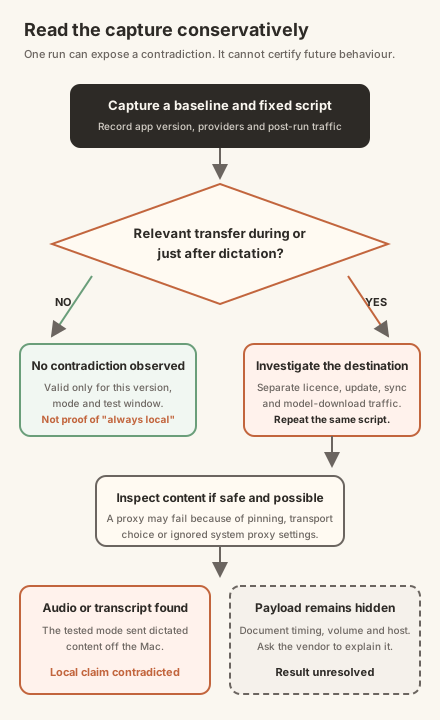
Four outcomes are defensible:
- No relevant transfer was observed in the tested version and settings. This supports, but does not prove, the local claim.
- A destination appeared, but its purpose is unresolved. Ask the vendor what stage uses it and repeat the test with licensing, updates or sync separated where possible.
- Traffic tracked the recording or processing window. The app moved data at the relevant time; inspect the payload if it is safe and possible.
- The payload contained audio or transcript text. The tested mode was not wholly local, whatever the marketing page called it.
Blocking the network is a useful companion test. If the full workflow still completes with Wi-Fi disabled after all models are downloaded, you have shown that this configuration can operate offline. You have not shown that every mode is local, that nothing is stored on disk, or that the app will not make operational calls after reconnection.
Apple makes the same configuration boundary explicit. Its current Mac guide tells users to check the wording under System Settings > Keyboard > Dictation to see whether general Dictation for their language and setup is processed on-device and not sent to Siri servers. Search-box dictation can differ, and Apple separately asks whether the user wants to share audio recordings for improvement. [7]
Apply the same test to ShoutFlow
ShoutFlow's current public privacy policy says its local mode runs transcription and clean-up on the Mac, while selected BYOK stages send audio or text directly to the chosen provider. Licensing, trial and update traffic are separate operational calls to ShoutFlow services. [8]
Those are our claims, not the result of a controlled test documented in this article. The current source code on the remote main branch has separate provider selections for transcription and clean-up, with local providers for both stages and direct provider adapters for cloud choices. The public stable download does not expose a source commit, so that source inspection does not prove an exact binary match.
Run the same four passes against the version you downloaded. Select local transcription and local clean-up, confirm the models are ready, record the idle licence traffic, then dictate the test script. Repeat with one BYOK stage selected. The expected difference is specific: local mode should show no dictated-content transfer, while BYOK should show a direct connection to the provider chosen for that stage. If your capture shows something else, keep the evidence and challenge us on it.