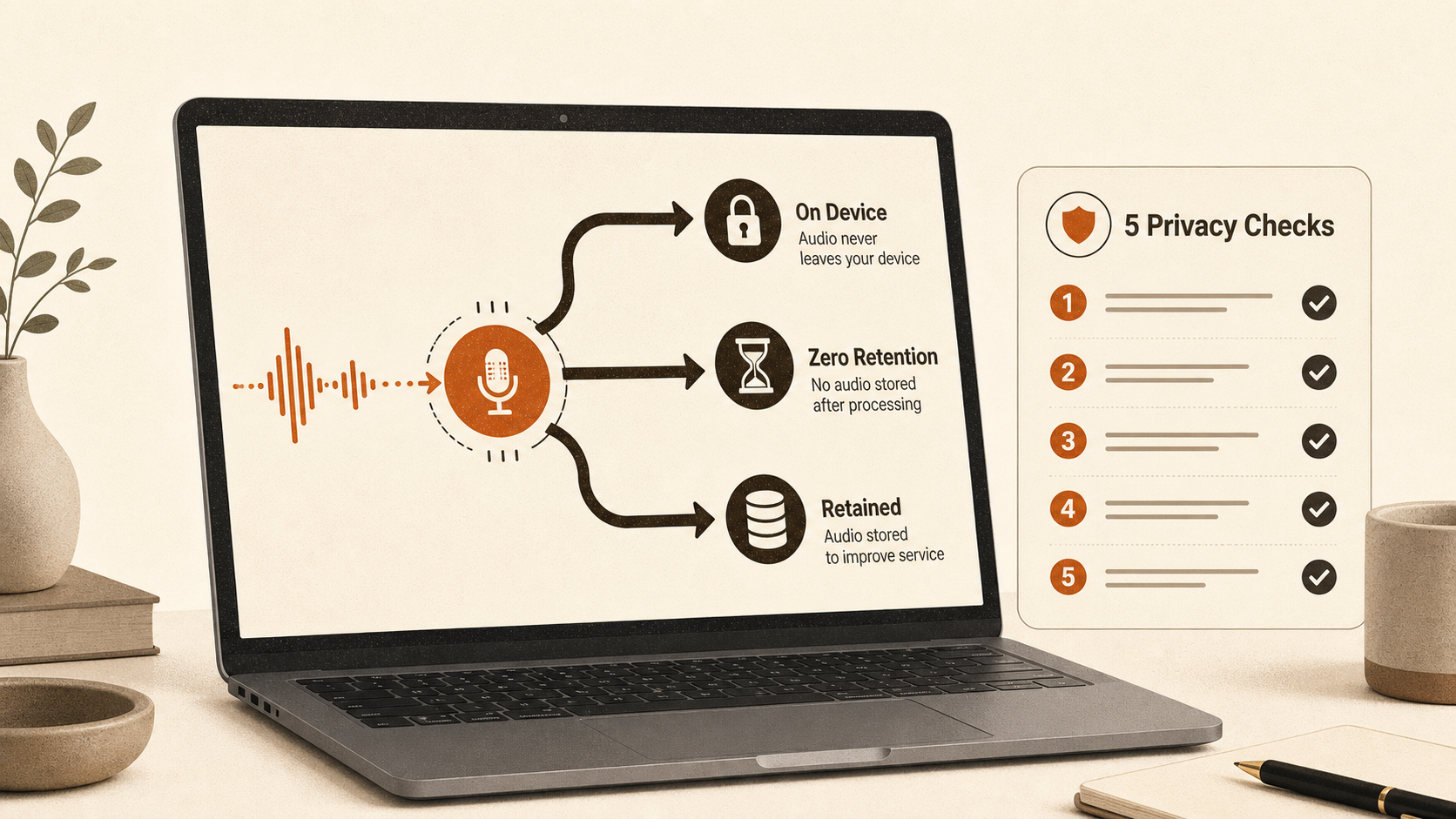
Dictation can be private, but the word tells you almost nothing by itself. The useful question is: for the mode you are using now, where do the audio, transcript and cleaned text go, and what remains afterwards?
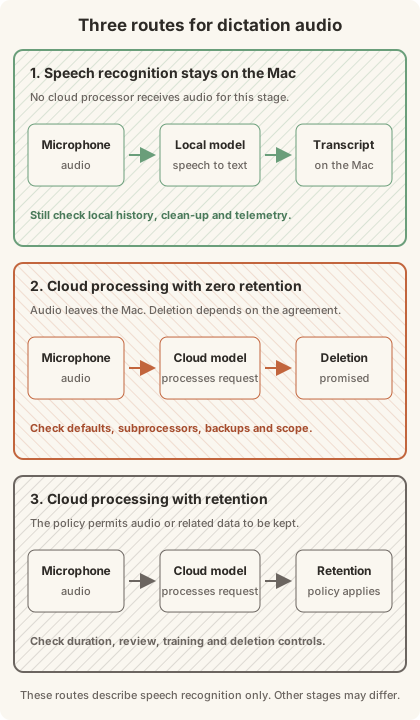
There are three common routes for the speech recognition stage. Audio can stay on the Mac, go to a cloud processor under a deletion promise, or go to a service that retains it. A single app may offer more than one route. It may also transcribe locally while sending the resulting text elsewhere for clean-up. Judge the active workflow, not the logo on the app.
Start with five separate checks
Privacy claims become slippery when several different data flows are bundled together. Write down the answer to each of these:
- Where is microphone audio turned into text?
- Does a second model receive the transcript for punctuation, rewriting or formatting?
- Does the app save audio or transcript history on your Mac?
- Which company receives each cloud request, and what does its retention agreement cover?
- What separate traffic handles licensing, updates, crash reports or analytics?
That fifth check matters. A licence request does not mean your recording was uploaded. Equally, offline transcription does not prove the app has no other network traffic.
Local speech processing removes a third party, not every storage risk
With a local speech model, the microphone samples and speech recognition run on the Mac. No cloud processor needs the audio for that stage. This is the cleanest route for confidential work because there is no transmission or remote deletion promise to trust.
Do not stop at the word "local", though. The app may keep a transcript history, save recordings for replay, sync text through another service or send the transcript to a cloud model for clean-up. Local storage also matters on a shared or poorly secured Mac.
A credible local workflow therefore names both processing stages and the storage behaviour. "Local transcription" is narrower than "nothing leaves the device". The second claim needs evidence about clean-up, fallbacks and operational traffic too.
Zero retention is useful, but it is still a promise
Cloud processing can be a reasonable middle ground when the supplier commits to discarding audio and text after the request. It avoids keeping a long-lived copy, but the data still crosses the network and is available to the processor while the request runs.
Wispr Flow illustrates why the settings matter. Its current Data Controls page says transcription always runs in the cloud. Zero retention requires Privacy Mode to be enabled and Private Cloud Sync to be disabled. With Private Cloud Sync on, transcription data is stored on Wispr's US-hosted infrastructure. Wispr also says it has zero-retention agreements with its third-party AI providers. [4]
Microsoft makes a narrower statement about Word Dictate: speech is sent to Microsoft, while the Dictate service does not store the audio or transcribed text. [5] That is evidence about this feature, not a blanket claim about every Microsoft voice product.
Deletion language needs the same precision. Ask whether it covers audio, transcripts, edits, prompts and backups. Check whether it applies by default or only after you change a setting. A certification badge can support confidence in a control system, but it does not change where a particular request goes.
Retention and training need product-specific evidence
Some services retain voice data or permit samples to be used for improvement. The exact default, account type and opt-in state matter more than the brand name.
Apple provides a concrete example. If you opt into Improve Siri & Dictation, Apple may store audio, transcripts and related request data for up to two years. A subset can be reviewed by graders, with audio review carried out by Apple employees. Reviewed interactions may be kept for longer. [2]
Be wary of articles that put every browser dictation feature into the same bucket. Google Docs says the web browser controls its speech-to-text service, including how speech is processed and sent. [6] That means "Google Docs voice typing" is not enough information to establish one universal retention route. You need the browser, account and current policy for the service actually doing the recognition.
The practical risk is straightforward. A casual shopping list and a privileged client note do not deserve the same treatment. For sensitive material, uncertainty about retention is itself a reason to choose a verified local route.
Apple Dictation has a setting that answers the routing question
Apple's current Mac guide does not ask you to infer privacy from whether the machine has an Intel or Apple Silicon processor. It tells you to look below Dictation in System Settings > Keyboard. The message there says whether voice inputs and transcripts for general text Dictation are processed on the device and not sent to Siri servers. Search boxes can behave differently. [3]
Apple's privacy notice draws the same boundary. When Keyboard settings says processing is on-device, audio and transcripts are not sent to Apple servers. Otherwise, what you dictate is sent to Apple's servers for processing and is not stored unless you opt into Improve Siri & Dictation. [1]
Apple may still store related request data. For server-processed requests, its request history can include transcripts and is associated with a random device-generated identifier that rotates several times per hour rather than an Apple Account or email address. Apple says it may retain that history for up to two years for product improvement. [1]
So the safe answer is conditional: check the message on your Mac, for the language and field you use, then check whether Improve Siri & Dictation is enabled. The earlier shortcut of "Apple Silicon equals local, Intel equals cloud" is too broad for Apple's current documentation.
Test the exact mode, then inspect what the test cannot prove
An offline run is a useful first test, not a full privacy audit. Paraspeech's published protocol gets the scope right: record the signed app version, hardware, selected speech and rewrite modes, model readiness and fallback state before isolating the network. Then dictate a short note and record which backends were active. [7]
If the note appears, you have shown that the tested speech and clean-up path can complete offline. You have not shown that every mode is local, that no data is stored on disk, or that the app never makes operational connections when the network returns.
A stronger check uses a network monitor such as Little Snitch. Block the app or record its destinations during a controlled dictation. Repeat the test once with local processing selected and once with the cloud option you are considering. Keep licensing and update calls separate from requests carrying audio or text.
Then inspect local storage. Check the app's History screen and preferences. Look for an option to clear or disable history. On a shared Mac, full-disk encryption and separate user accounts matter even when speech recognition never leaves the machine.
Match the evidence to the work
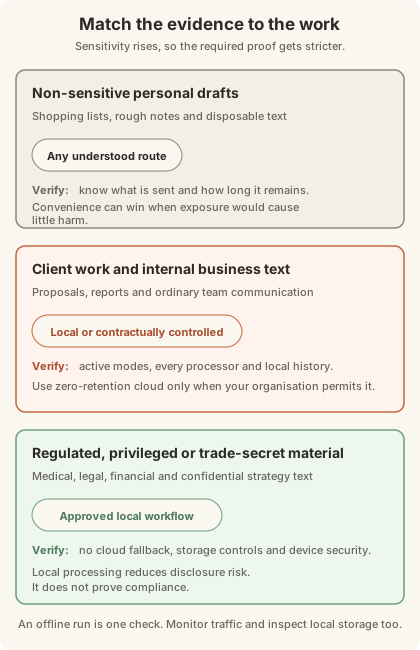
For personal notes and ordinary drafts, any route may be acceptable once you understand it. Convenience can reasonably win when the content would not cause harm if retained.
For internal business documents or client work, prefer a verified local route. A properly contracted zero-retention service may also be appropriate if your organisation permits it and the agreement covers every processor in the path.
For privileged, medical, financial or trade-secret material, use an approved local workflow with cloud fallback disabled. Verify local history and device security as well. Local processing removes a major third-party disclosure risk, but it does not make a product or organisation compliant with GDPR, HIPAA or professional duties by itself.
ShoutFlow's boundary, including the bit stored on your Mac
ShoutFlow separates transcription from clean-up. In local mode, current product documentation says WhisperKit handles speech recognition and an MLX model handles clean-up on the Mac after the models have downloaded. [8] Current source implements those as separate local providers. Audio is held in memory for processing rather than written as a recording file.
The app can keep the last 50 raw transcripts in a local history.json file when Take History is enabled. That is useful, but it is still sensitive local storage. Clear the history if the Mac is shared or the material should not persist.
Cloud options are selected stage by stage. A cloud transcription provider receives audio; a cloud clean-up provider receives text. Requests go directly from the Mac to that provider rather than through ShoutFlow's servers. [8] BYOK describes that routing and billing relationship. It does not guarantee zero retention. The selected provider's terms and account controls decide that.
ShoutFlow's servers handle licensing and product operations, not dictated audio or transcript processing. The public release requires macOS 14 or later on Apple Silicon and costs $25 once for one Mac. If you need Windows, Intel support or an organisation-wide compliance agreement, it is not the right choice.
Whatever app you choose, keep the decision rule simple: name both processing stages, check what remains on the Mac, and verify every company that receives the request. If one of those answers is missing, the privacy claim is not yet proven.