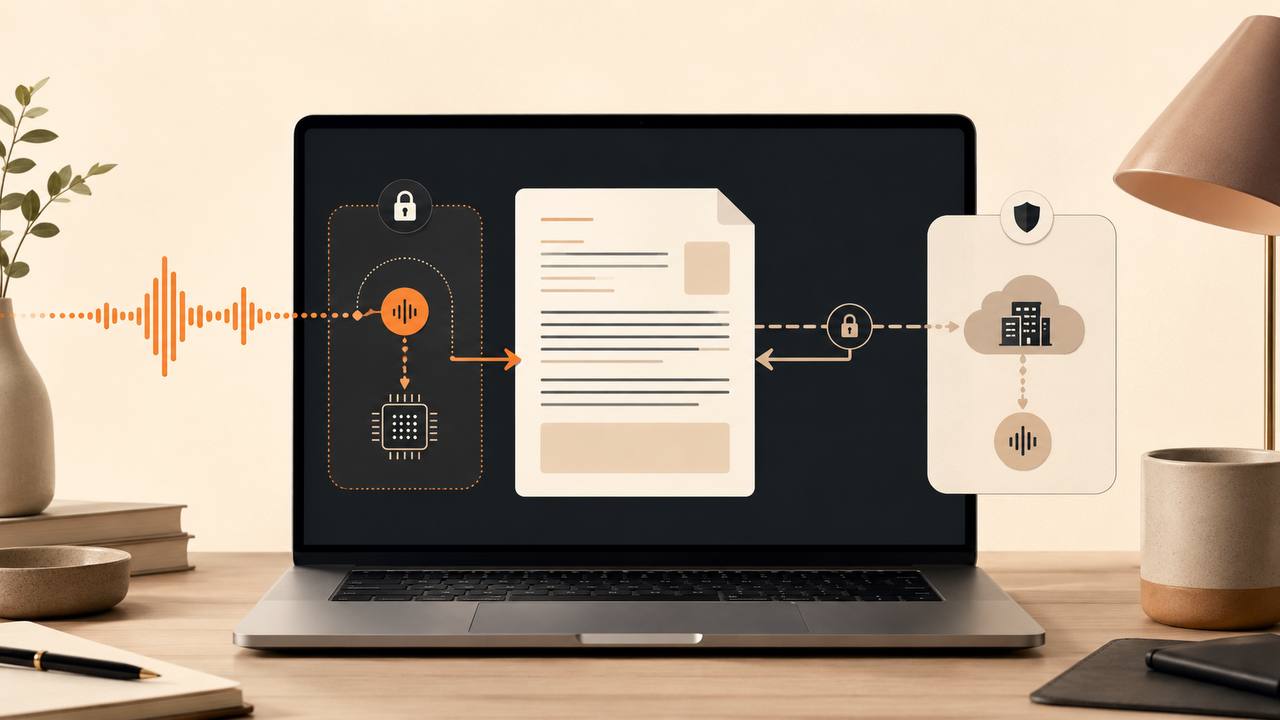
Choose a private Mac dictation app by tracing what happens at five stops: capture, transcription, clean-up, insertion and history, and product operations. At each stop, ask three things: what data exists, where it goes and when it's deleted. Then test the exact mode you plan to use.
That's the short answer. A "private", "local" or "zero retention" badge isn't enough, because dictation is a chain of decisions and one app can offer several very different chains.
Judge the privacy path in one minute
Use this rule:
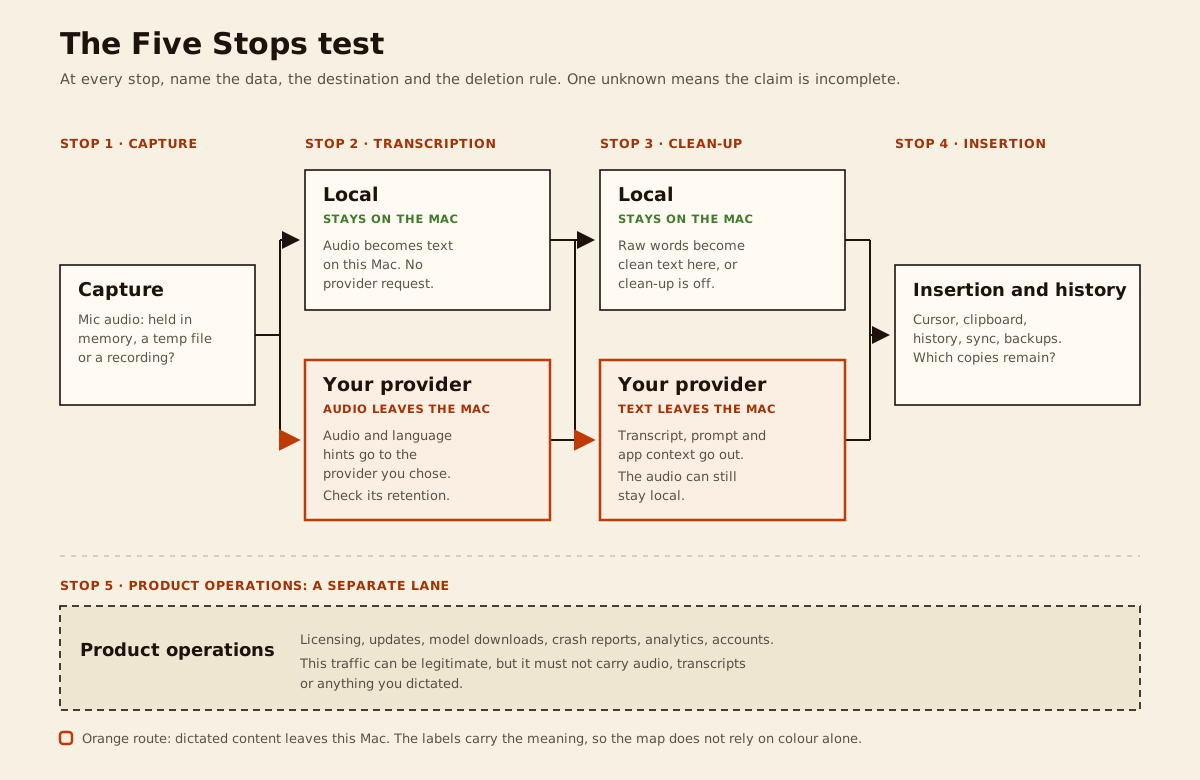
At every stop, name the data, the destination and the deletion rule. If one is unknown, the privacy claim is incomplete.
Call it the Five Stops test. It's deliberately stricter than asking whether an app is "on-device", because speech recognition is only one part of modern dictation.
- Capture: your microphone produces audio. Is it held in memory, written to a temporary file or saved as a recording?
- Transcription: a speech model turns audio into raw words, either on your Mac or on a server.
- Clean-up: another model may remove filler, fix self-corrections and format the result. Where does it run, and what context travels with the transcript?
- Insertion and history: the text reaches your cursor, clipboard or an in-app history. Which copies stick around?
- Product operations: licensing, updates, accounts, crash reports and analytics can use the network without touching your words. What does the app send for those jobs?
The right app is the one whose configured path stays inside the boundary your work requires. Its ordinary operations shouldn't quietly carry audio or transcript text beyond that boundary either.
What privacy labels leave out
Privacy labels usually hide four decisions: who sits outside your boundary, what they receive, how long they keep it and which mode the promise covers. Raw audio, transcript text, dictionary terms and prompts all have different exposures, and "not used for training" doesn't mean "not stored".
The homepage might say local while the settings offer a cloud mode and the policy names subprocessors. Those statements can all be true at once, because they describe different routes. Your job is to identify the route that's active when you press the hotkey.
Which path fits your work: local, BYOK or vendor cloud?
There's no single right answer for every document. Start with what each path actually sends.
| Path | What crosses the Mac boundary? | Who operates the models? | What you gain | What you must verify |
|---|---|---|---|---|
| Local transcription + local clean-up | Dictated content need not leave the Mac | Your Mac | Strongest content boundary, offline-capable workflow, no per-use model bill | Temporary audio, local history, logs, model downloads and product operations |
| Local transcription + BYOK clean-up | Transcript text and clean-up context go to your provider | Your Mac, then your chosen provider | Voice audio stays local; stronger remote rewriting may be available | Exact endpoint, account tier, retention, prompt contents and direct routing |
| BYOK transcription + local clean-up | Audio and transcription hints go to your provider | Your chosen provider, then your Mac | Cloud speech model without sending the transcript to a second clean-up provider | Audio endpoint terms, direct routing, deletion and local history |
| BYOK for both stages | Audio goes to the transcription provider; text and context go to the clean-up provider | Providers you select | Provider choice, metered billing and no need for the app maker to proxy content | Both endpoints and policies; whether one or two providers receive data |
| Vendor cloud | Whatever the vendor's service requires | App vendor and its subprocessors | Simple setup, bundled compute, cross-device features and support | Data map, subprocessors, retention controls, account deletion and contracts |
The local path
Fully local models are the clearest choice when a draft must not reach an external processor. It keeps working in poor connectivity, and once the models are downloaded there's no per-minute or per-token bill; the subscription cost maths is a separate argument entirely.
It doesn't make the whole Mac private, though. The finished text may land in a browser or a cloud-synced notes app, and a local history can end up in a backup. Stops 4 and 5 below cover those copies.
Local performance depends on your hardware and the model size, so test with your accent, your vocabulary and your normal Mac workload. Privacy doesn't rescue a tool that mangles defined terms or stalls your writing.
BYOK changes the middleman
BYOK means you supply an API key for a model provider. In a well-separated design the request goes straight from your Mac to that provider, which takes the app maker out of the content path. It doesn't keep the request local: a transcription provider receives your audio, and a clean-up provider receives your text plus instructions and context.
Because you choose the provider, the account and the billing relationship, read the terms at endpoint level. Three current examples show why:
- OpenAI's data-controls table lists no abuse-monitoring or application-state retention for /v1/audio/transcriptions, while /v1/chat/completions defaults to 30-day abuse-monitoring retention. API data isn't used to train models unless you opt in. [3]
- Google's Gemini API terms split into unpaid and paid services. The unpaid tier permits product-improvement use and human review, and tells you not to submit sensitive or confidential information. The paid tier doesn't use prompts to improve products, though limited logging remains for prohibited-use detection and legal disclosures. Your region and billing status decide which tier applies. [4]
- OpenRouter documents zero-data-retention routing account-wide or per request, and says prompts aren't retained unless you opt in to logging. The control covers inference routing only; plugins, tools and in-memory caching are treated separately. [5]
These are dated facts about specific endpoints. Don't assume a provider's consumer chat product runs under the same rules as its API.
Vendor cloud is sometimes the right call
Vendor-cloud apps bundle fast models, mobile clients and support, which can suit ordinary correspondence or a team with an approved contract. You're trusting the vendor's choices, so look for a readable data flow, named subprocessors, a deletion route and a straight answer about training. Check which privacy mode is on before your first dictation.
Cloud processing is fine when it's permitted for the material, visible to you and governed by suitable terms.
The Five Stops on your Mac
1. Capture: does a recording survive the session?
An app can honestly transcribe locally and still keep every recording on disk. Ask whether it streams audio from memory, writes a temporary file or builds a library of recordings. If files exist, find the folder, the deletion rule and what happens after a crash.
Look for controls to disable recordings and clear existing ones, and check whether your backup includes that folder. Apple says Time Machine, once it's on, automatically backs up your files, including documents. [13]
Microphone permission is expected. What matters is when capture starts, whether an indicator shows and when it stops.
2. Transcription: where audio becomes text
Most privacy pages do cover this stage. What they often skip is which model your current settings actually use, so verify the selected mode rather than the best available one.
If it's local, the core workflow should still produce text with Wi-Fi off once the models are installed. If it's cloud, identify the provider, the endpoint, the retention and training rules, and whether a personal dictionary or language hint travels with the audio.
Built-in macOS Dictation deserves the same check. Apple says Keyboard settings shows whether your voice input and transcripts for general Dictation are processed on-device. [2] If they aren't, dictated content goes to Apple's servers, and it isn't stored unless you opt in to Improve Siri and Dictation. [1] Read the current status on your own machine rather than trusting the age of the Mac or a third-party blog.
3. Clean-up: the stage privacy pages forget
Modern tools remove "um", resolve "no, Tuesday, sorry, Wednesday", fix punctuation and rewrite for the app in front. First ask whether you can switch that off. Then ask where it runs.
Pairing a local speech model with a cloud language model isn't a local path, even though your voice stays on the Mac. The remote request can include the raw transcript, a system prompt, dictionary words and the name of the destination app.
Local voice with provider clean-up is a sensible compromise for some work. For restricted text, keep clean-up local or off. Either way, compare the output with what you actually said: a smoother sentence can still make a contract clause wrong.
4. Insertion and history: the copies that remain
System-wide dictation places text by simulating typing, pasting through the clipboard or leaving you to paste manually. Ask which one your app uses.
Clipboard use creates a short-lived but real copy, and a clipboard manager may keep it. With Universal Clipboard on, Apple says copied content is automatically added to the clipboard of your other nearby device signed in to the same Apple Account, where it remains briefly. [12] The destination app may then sync the text to its own service.
For history, check the default, the contents, the location and whether clearing actually clears. A local history is still content at rest.
5. Product operations: traffic without your words
Even a local-first app may still contact services for licensing, updates, model downloads or crash reports. "It made a network connection" and "it uploaded my dictation" are different findings.
The vendor should name the purpose, destination and fields of that operational traffic, including whether crash reports can contain user text. A licence refresh is ordinary; your words inside it would not be.
How do you verify the app's claims?
Use a distinctive, harmless test sentence such as copper-lantern-742. Never dictate client material or a real API key: verification shouldn't create a new secret inside the very logs and histories you're inspecting.
Step 1: write down the promised route
Record the transcription mode, clean-up mode, history setting and cloud account, and save the dated policy passages. If the app won't identify both model stages, put that on the record as an unknown. For a BYOK provider, capture the exact endpoint and account tier.
Step 2: test the local route offline
Download the required models first. Quit the app, turn off Wi-Fi, disconnect Ethernet, then reopen it and dictate into a local editor.
If the result completes, the tested route can work without a server. Failure may just mean licensing or a missing model, and a pass says nothing about other modes or local copies.
Step 3: watch the network totals
Open Activity Monitor, select Network, and note the app's bytes sent and received before and after a test. Apple documents that this view shows packets and data transferred. [6]
Rising totals prove traffic, though not its contents. Destination-level answers need a network monitor or packet capture.
Step 4: search Console for your marker
Filter Console by the app's process and search for your test phrase; Apple documents both filters. [7]
Finding your words in logs is a problem worth reporting. Not finding them only clears the logs you could see.
Step 5: inspect the local copies
Use the history view, your clipboard manager and any documented storage controls. Clear the test entry, quit and reopen the app, then confirm it stayed gone. Check whether audio recordings are exposed anywhere in the interface.
Step 6: repeat after settings changes
Switching clean-up to a cloud model, enabling a "smart rewrite" or signing into a sync service all change the path. Re-run the route check after meaningful changes, and revisit provider terms occasionally.
These checks track what users actually worry about. Mac Power Users threads ask whether custom vocabulary survives, whether punctuation behaves and whether clean-up rewrites prose in unwanted ways. [11] On Hacker News, technical readers pushed back when "stored locally" sat beside an unexplained cloud route. The developer of one open-source tool even describes switching between local and cloud engines depending on sensitivity. [10]
What should an app disclose up front?
Enough that you can answer the Five Stops before you install. That means naming transcription and clean-up separately and stating what each cloud stage sends. It also means explaining insertion and history, separating product operations from content traffic, and linking current provider terms. A promised local route should admit any model download or activation step.
Missing answers are unknowns; treat them that way instead of assuming the safer behaviour. Contradictions are the real red flags: "fully local" beside a mandatory cloud stage, "nothing leaves" beside remote clean-up, or "zero retention" with no named processor.
Privacy is only the first gate. Once a path fits your boundary, pick the tool that's accurate, fast and pleasant enough to use every day.
What a ShoutFlow desk review does and doesn't show
Disclosure: we make ShoutFlow, and a desk review of our own public pages can't complete the Five Stops test. For this article we read the privacy policy for content handling and the homepage for modes, requirements and price. [8] [9]
Those pages say ShoutFlow separates transcription and clean-up. In local mode both stages run on the Mac once the models are downloaded. In BYOK modes the audio or text request goes straight from the Mac to the provider you selected, under your own key. ShoutFlow's servers stay outside that content path: licensing runs without dictated audio, transcripts, prompts or provider keys. History, dictionary data and credentials remain on the Mac, with API keys in the macOS Keychain. [8] The homepage adds the practical constraints: macOS 14 or later on Apple Silicon, a one-time purchase, an initial model download for local mode, and BYOK usage billed by your provider. [9]
On disclosure alone, that answers most of the framework. Capture starts on the Mac, both model stages name a local or selected-provider route, and licensing is described as separate network traffic. But they're first-party claims, current on 2026-07-24, and we didn't run the offline, network or log checks above for this article. Treat our pages the way you'd treat any vendor's: verify them on your own machine.
Build modes around classes of work
The best privacy setting is the one you'll use correctly when you're busy. Decide per class of work instead of changing toggles sentence by sentence.
Confidential drafting
For client strategy, unpublished numbers or anything your organisation treats as privileged, set both stages local. Use a local destination app if its sync policy isn't approved, and disable or regularly clear dictation history.
Name the mode Confidential: local only and test it offline. The clear name stops yesterday's fast cloud setting from handling today's sensitive paragraph.
Mixed professional work
Keep transcription local so raw voice never reaches a provider, and use BYOK clean-up under an approved account for routine emails and internal prose. Switch clean-up off or local for restricted material. This treats speech audio and transcript text as the separate assets they are.
Cloud-first convenience
For low-sensitivity writing, a vendor-cloud or full-BYOK path can prioritise speed, cross-device access and model quality. Choose retention settings deliberately and know how to delete history.
Naming it Routine: cloud allowed is more honest than Smart or Fast, because the name reminds you what changes. Don't let frictionlessness smuggle sensitive work into this mode.
Whichever mode you build, test it on real work: a technical correction, a proper noun, a paragraph break, a false start. Then judge accuracy, latency, price and how much control you keep over rewriting.
Make the final choice
Set the boundary for each class of work, map the exact mode through the Five Stops, and verify its claims with harmless material. If the path holds, choose the tool you'll actually enjoy using daily. That's a mode-specific answer, and it's the only kind a privacy question deserves.