You can dictate in another language on a Mac without changing the system language. Start with Apple's built-in Dictation if your language is listed. If it is missing, or the correction work makes dictation pointless, test a multilingual engine with an explicit language setting. Do not choose by the biggest number on a product page. Choose by the correction count from your own voice.
Set up Apple's languages first
Open System Settings > Keyboard and turn on Dictation. Next to Languages, click Edit and select each language and region you use. Apple lets you switch while dictating by clicking the language next to the cursor. You can also press the Globe key, if your keyboard has one, and choose the language there. [1]
That last step matters. Apple's documented workflow is manual: select the language you are about to speak. It does not promise to follow every language change inside a sentence.
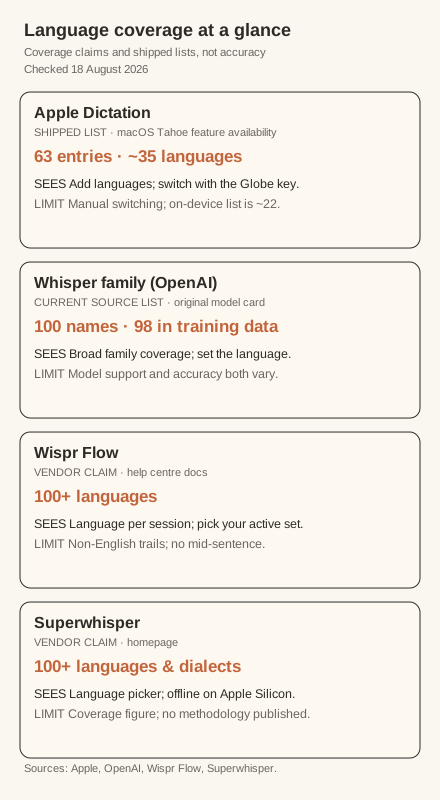
The current macOS Tahoe availability page lists 63 language-and-region entries. Once regional variants are grouped together, that is roughly 35 language labels. English accounts for 15 entries, while several languages have only one. [2] This is a useful coverage list, not an accuracy table.
Apple also publishes a smaller list for on-device and modeless Dictation. It contains 48 language-and-region entries plus a note that speech models must be downloaded, amounting to roughly 22 language labels after regional variants are grouped. [2] If your language appears on the main list but not this subset, do not assume its audio stays on the Mac. Keyboard settings tell you whether voice input and transcripts for general Dictation are processed on the device. [1]
Test the built-in route before replacing it
Apple Dictation costs nothing extra and works anywhere you can type. Give it a fair ten-minute test before installing another app.
Use text you would genuinely write. A support reply, project update or paragraph from your own notes is better than a clean newsreader script. Include names and specialist terms because those are often where corrections pile up.
Record the result in a small ledger:
| Test | Words spoken | Wrong words | Missing words | Language mistakes | Corrections needed |
|---|---|---|---|---|---|
| Apple Dictation | |||||
| Second engine |
Do not reduce the result to one vague feeling about accuracy. A tool that misses three ordinary words may still be usable. A tool that changes names, numbers or the active language can create much more work.
When Whisper is worth testing
Whisper is a multilingual speech-recognition family released by OpenAI. Its current tokenizer source names 100 languages, while the model card says the original non-English training data represented 98 languages. [4] [5] The exact languages available can depend on the Whisper model and implementation, so treat the source list as family coverage rather than a guarantee for every app.
The important warning comes from OpenAI, not a competitor. Whisper's model card says its models show strong speech-recognition results in roughly ten languages, that performance is tied to the amount of training data for each language, and that accuracy is lower for low-resource languages. It also warns that Whisper can produce words that were not spoken. [4]
OpenAI's own command-line example sets the spoken language explicitly for non-English transcription. [3] That is the sensible default in a Mac app too. If the app offers a language picker, select your language before the test. Use automatic detection only after it has proved reliable for your language pair.
The practical rule is simple: broad coverage earns a test, not trust.
Treat code-switching as a separate problem
Switching languages between paragraphs is different from mixing them inside one sentence.
Apple documents an explicit language switch from the cursor control or Globe key. [1] Wispr Flow takes another approach: its help centre says it detects one language at the start of each dictation session and transcribes the whole segment in that language. It also says rapid switching within a sentence is not supported, although it has a dedicated Hinglish option and can cope with occasional words from another language in some combinations. [6]
That evidence supports a narrower conclusion than "multilingual" marketing often suggests. A tool may cover both languages and still mishandle a sentence that moves between them.
If code-switching is part of your real work, add a second test:
- Speak one full sentence in language A.
- Speak the next full sentence in language B.
- Try one sentence that mixes both.
- Record whether the tool picked the right script and spelling each time.
Keep those results separate from the single-language test. Otherwise one difficult mixed sentence can make a good single-language engine look worse than it is.
Read vendor language counts carefully
Wispr Flow says it supports more than 100 languages and regional variants. The same help page gives useful limits: non-English transcription is less accurate than English, detection happens per session rather than per word, and some language pairs work better than others. [6]
Superwhisper also claims support for more than 100 languages and dialects. Its homepage shows offline transcription and a language control in its mode settings, but it does not publish a per-language accuracy method alongside the coverage figure. [7]
Neither figure tells you how your microphone, accent or vocabulary will perform. It also does not make the two products equivalent. Their workflows, processing routes and correction tools differ. This article has not run a controlled comparison between them, so it does not rank them.
Use one repeatable decision rule
Here is the routine:
- Check Apple's current list. If your language is there, add the right region and test the built-in Dictation first.
- If the language is absent or the correction ledger is poor, test one app that exposes the recognition language.
- Set the language manually for the first run. Test automatic detection afterwards.
- Use the same two-minute sample, microphone and room for both tools.
- Choose the option that leaves less correction work in the text you actually write.
If you regularly mix languages inside sentences, repeat the test with that exact pattern. Do not assume a tool that handles each language separately will handle both at once.
What the evidence cannot tell you
There is no controlled, same-audio benchmark here comparing Apple Dictation, Whisper, Wispr Flow and Superwhisper across languages. We have not run those products side by side on this machine. Apple's list proves availability. OpenAI's documents prove broad but uneven model coverage. Vendor pages prove what those vendors currently claim. None predicts your personal correction count.
That is why the two-minute test matters. Check Apple's list, set the language explicitly, and measure the edits. If the built-in option works, stop there. If it does not, move to a broader engine and run the same sample again.